
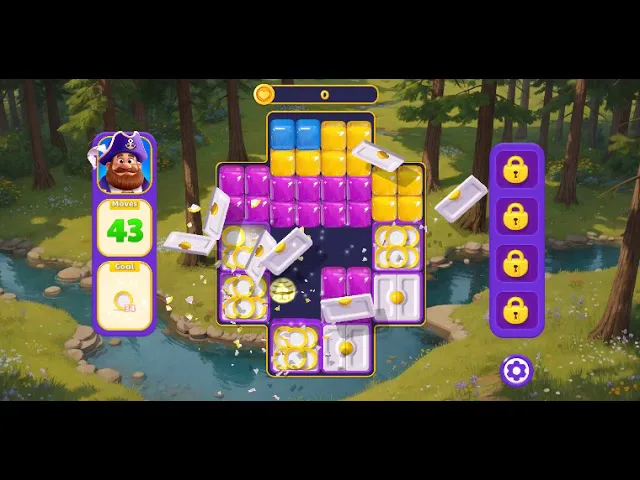
How the color-block board actually plays
This fan guide explains the portrait HTML5 puzzle published by Lianyu Games on CrazyGames: how a legal clear works, why gravity strands a lone tile, when a booster is worth spending, and what the public level recordings do and do not cover. It is a reading companion for the browser build, not a download and not a move-by-move answer key.
A legal click is a group of two
The board is a portrait grid of colored blocks. The published control line says to destroy groups of at least two connected blocks of the same color. A lone square cannot be selected, no matter how awkward it looks. That two-tile minimum is the whole game. Players who arrive from match-3 puzzlers keep tapping singles and waiting for threes; here a pair is already enough, and a single is already stuck.
The left mouse button is the control the listing names for desktop browsers. There is no download step on this page. The frame, when the publisher allows it, loads the official partner embed. Until that domain approval is in place the frame can stay blank, and the link under the board opens the same title on CrazyGames itself.
After a group disappears, gravity pulls the tiles above it downward. The next shape is not the shape you clicked. A pretty cluster in the middle can be the wrong click if it leaves one tile of a color sealed in a corner. Read the board you are about to create, not only the cluster under the cursor.
The objective is not always an empty grid
Early stages feel loose because almost any pair clears and the goal is close to “remove blocks.” Later stages put a specific job on screen: a score bar, a count of broken blockers, or a set of pieces that have to be collected. Emptying the grid can fail the stage if the collected pieces never reached the bottom, and clearing the objective can succeed while tiles are still sitting there. Look at the goal before the first click of every attempt.
A move counter, when it is showing, is spent by extra clicks. Isolated pops of two-tile groups burn that counter without changing the board much. Larger groups and drops that set up the next group are how you stay inside the limit. If the counter hits zero with the goal unfinished, the useful response is a different opening click, not the same cascade played faster.
When the goal counts broken blockers or collected pieces, treat those obstacles as the job, not as scenery. Setting up a large group on the side that serves the objective is usually worth more than chasing a flashy combo on the opposite side of the grid. The public notes on the opening stretch say the first boards forgive almost anything, then layouts around the mid-teens start punishing a stranded single. That is the moment to slow down.
Chains, corners, and the tile you cannot click
A chain is just gravity doing a second clear for you. You pop a group low on the board, tiles drop, and two colors that were separated now touch. If you popped the upper group first, those same tiles may never meet. Working from the bottom upward is the reliable habit: clear the supporting blocks, let the upper colors fall into each other, and only then take the new group. Top-down clicking feels busy and leaves the grid worse.
Corners are where singles go to die. Before you click, scan each corner and each narrow pocket beside a blocker. If a color appears there exactly once, every plan has to either bring a matching tile into that pocket or avoid the click that would isolate it. Once the single exists, no booster of patience will select it. The stage is already leaning toward a restart.
Restarting is part of normal play, not a failure of the rules. The same board can be easy or impossible depending on the first two clicks, because those clicks decide which colors are still able to find a partner. When a run dies to one leftover square, change the first click. Repeating the identical cascade only proves the same dead end. Write down nothing more complicated than “open on the bottom group,” then try the other bottom group.
Large groups are not automatically correct. A six-tile clear that splits the remaining colors into singles is worse than a three-tile clear that keeps every color in pairs. Count the leftovers. If a color would have one tile after the click, do not take that click unless a falling tile will join it on the same move. That one-second count prevents most of the stuck boards people describe in the early levels.
When a booster is actually worth it
The CrazyGames description says boosters help on the hardest puzzles and that combos produce bigger clears. It does not say to spend them on the first comfortable board. Easy stages are where the two-tile rule and gravity are enough. Save the limited tools for obstacle-heavy objectives, locked rows, and the last few moves of a counter.
A booster spent to finish a goal you were about to finish anyway is a wasted charge on the next stage, which is usually the one that needed it. If the goal is one blocker and a normal clear already sits beside it, make the normal clear. If the goal is buried and every ordinary click creates a single, that is the board the charge is for.
Third-party store pages sometimes name rockets, fusion balls, and drones for a build of this puzzle, and they sometimes quote a different level total than the browser listing. Those pages do not match the CrazyGames count of 4,800+ designed stages, so this guide does not treat their booster names as the browser build. Use the icons inside the official game. No separate booster-guide video was verified for this HTML5 title.
Combos are a result, not a button. You get them by ordering clears so that drops connect, not by clicking every group the moment it exists. If you are hunting a combo and the move counter is low, stop hunting and finish the printed objective. Score padding after the goal is already met does not help the next stage.
Lives, teams, and the ranking list
The official description lets you join or create a team, exchange extra lives, and earn bonuses, then compare results on a ranking list. The team screen lives inside the game. This fan page cannot see your roster, cannot send you a life, and cannot restore a run that ended. When the life counter hits zero, the in-game team screen is the place the listing points you.
Rankings are a comparison with other players of the same browser build, not a checklist of solved stages. A high rank does not publish the click order for stage 400. Treat the list as a scoreboard. Treat stuck stages as a pattern problem: objective, two-tile rule, gravity, then a different opening move.
Extra lives are the resource that lets you experiment. If a board has two plausible first clicks, spending a life on the second opening is cheaper than forcing a booster to rescue a bad first click. Teams exist so that experimentation does not end the session. Use them that way, and keep the boosters for boards that are hard even with a correct opening.
What 4,800 stages means, and what the videos cover
The English CrazyGames page describes 4,800+ designed levels, a May 2026 release, an update on September 23, 2026, and an 8.9 rating over the last six months. Lianyu Games is the developer credited there. A separate store listing that says about 5,000 levels does not match that browser count, so this site stays with 4,800+ for the HTML5 build and does not mix the two catalogs.
Difficulty ramps by adding obstacles, tighter move counts, and goals that are not “clear the screen.” The early catalog is the part people record. Public recordings currently walk stages 1 through 290 and then stop. The rest of the list is still where a stuck player has to reason from the rules instead of from a video.
Skyowner Games published eight HTML5 recordings that matched searches for gameplay, level 1, walkthrough, and this puzzle: 1–35, 35–70, 70–105, 105–140, 140–175, 175–210, 210–245, and 245–290. They are embedded on this page as a pattern guide. They are not a full answer key, and they do not reach the far end of a 4,800-stage catalog. Watching the range that contains your stage is useful for the shape of obstacles. Copying clicks from a different stage number will not transfer.
Searches for a single stage, especially “level 100,” often return other games: Angry Birds Blast, Toon Blast, Toy Blast, and similar names. Stage 100 of this puzzle sits inside the 70–105 recording, not in those other series. If a video’s pieces, camera, or title card do not match the portrait color-block board, it is the wrong game.
Desktop portrait play, and a frame that stays blank
CrazyGames lists the build as HTML5, portrait, and desktop-browser only. A wide monitor does not turn the board into a landscape game; the playfield stays tall. Give the frame a narrow column and use the left mouse button. Touch controls are not what the listing documents, so a phone-sized window is a poor test of whether the game itself is broken.
This page does not rehost the game files and does not sell a download. The iframe source is the official partner address, https://www.crazygames.com/embed/captain-blast. A direct request to that address can return 401, and the response can send X-Frame-Options: SAMEORIGIN, until captainblast.xyz is on an approved partner account. In a browser that refusal looks like a blank frame or a short partner-access message. It is not a cue to swap in a cracked file, a games.crazygames.com path, or any other mirror.
When the frame fails, use the screenshot and the play link under it. That link goes to the public game page on CrazyGames, which is the supported place to play while partner access for this domain is still pending. Fullscreen and share on this page only affect the frame; they do not bypass the publisher’s allow list. After the domain is approved, the same official embed URL is the one that should start working, with no change of host.
Names that get mixed up with this puzzle
Several other products share a blast in the title and none of them are this board. Toon Blast is a different match puzzle with its own level numbering. Toy Blast and Angry Birds Blast show up in the same search results and in the same “level 100” queries. A YouTube channel whose name is easy to confuse with this game is a video channel, not the Lianyu HTML5 release. If the pieces are not plain color blocks on a portrait grid, you are reading the wrong guide.
This website is an independent fan guide. It quotes the public CrazyGames facts above, points at the eight public recordings through stage 290, and describes the two-tile rule, gravity, boosters, teams, and the blank-frame case. It does not speak for Lianyu Games or for CrazyGames, it does not operate the ranking list, and it does not unlock lives. Strategy notes here are ways to apply those published rules, not a claim that any single click order is the official solution.
If you are stuck, the order of checks is short. Confirm the on-screen goal. Confirm you are on the portrait color-block board and not a different blast game. Scan corners for a color that appears once. Rebuild the next group from the bottom instead of popping every pair on sight. Hold boosters for the obstacle that actually blocks the goal. If the frame on this domain is empty, open the official CrazyGames page and play there. The recordings through stage 290 are the pattern reference; past that point the same rules are the reference, because the public videos end.